
If you have ever opened up a classic 1980s pinball pcb only to find a fuzzy, green, corrosive mess where the battery holder used to be, you are officially part of the club. Welcome. It is a rite of passage for every collector and technician in the arcade world. That crusty blue green "fuzz" is the death knell for many vintage arcade boards, but it does not have to be the end of the road for yours.
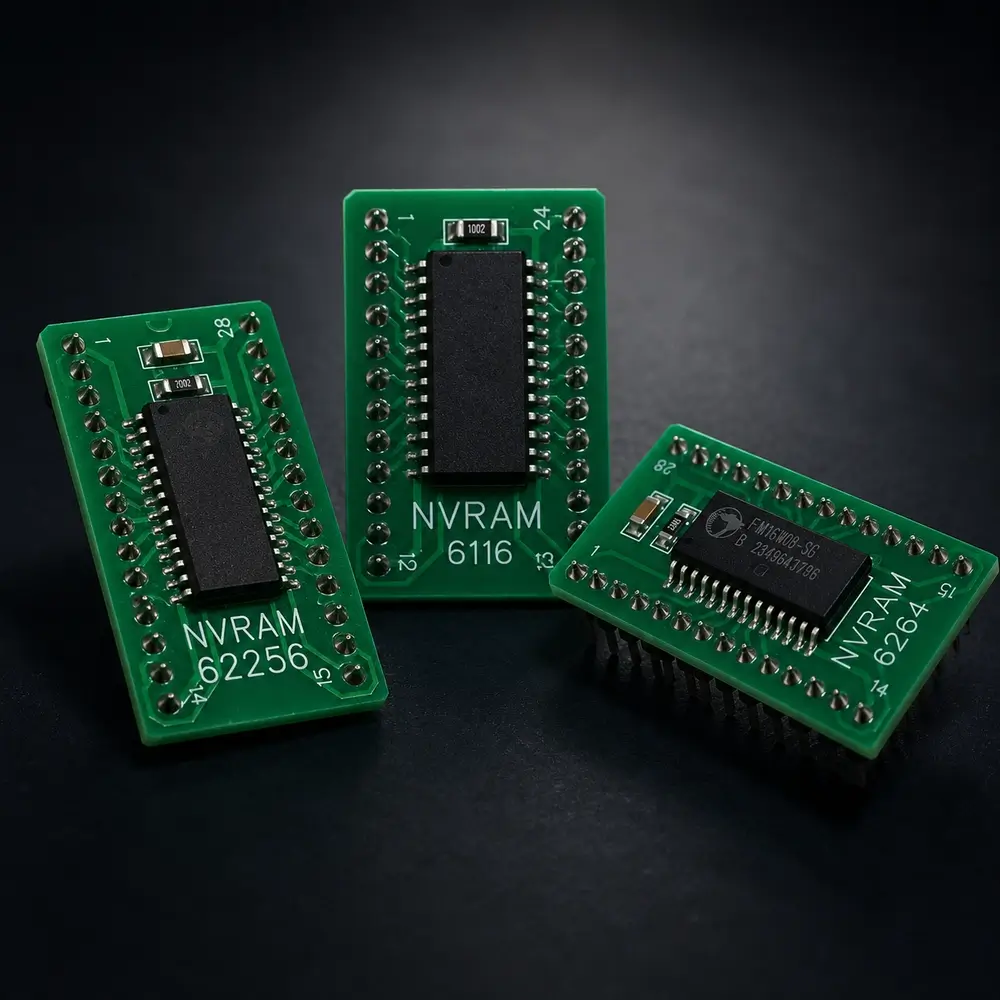
At GeekPCB's, we believe that vintage tech deserves a future that is not reliant on leaky AA batteries. The solution is simple: pinball NVRAM (Non Volatile Random Access Memory). It is the ultimate "set it and forget it" upgrade for your machine. But before you go ripping out chips, you need to know exactly what you are looking at.
This guide is your Rosetta Stone for RAM. Whether you are trying to figure out if a 6116 can be swapped for a 6264 or you are staring at a cryptic part number on a Data East board, we have got you covered.
Why Switch to NVRAM?
Let's be honest: alkaline batteries are basically time bombs for your electronics. They are designed to leak eventually, and when they do, they eat through traces, sockets, and components like a hungry Xenomorph.
Switching to NVRAM means you can remove those batteries forever. Here is why it is the best move for your pinball board:
- Zero Leakage Risk: No batteries means no acid damage. Period.
- Permanent Data Retention: Your high scores and settings will stay put for decades, even if the machine is unplugged in a dusty garage.
- High Quality Components: Our modules are tested and built for makers who care about reliability. Plus, they look sexy, and why not?
- True Plug and Play: On many systems, if you already have a socketed RAM chip, it is as simple as "out with the old, in with the new."
Pinball NVRAM and Common RAM Replacements
Finding the right replacement can be a headache because manufacturers loved using different part numbers for the exact same thing. Use the table below to find your existing chip and the modern GeekPCB equivalent.
| Original RAM Part Number | Type / Capacity | Common Equivalents | GeekPCB Replacement |
|---|---|---|---|
| 5101 | 256 x 4 (CMOS) | SCM5101, HM6501, PCD5101 | GeekPCB 5101 NVRAM |
| 6116 | 2K x 8 (SRAM) | 2016, 4016, HM6116, M5M5117 | GeekPCB 6116 NVRAM |
| 6264 | 8K x 8 (SRAM) | 2064, 6064, HM6264, LH5164 | GeekPCB 6264 NVRAM |
| 62256 | 32K x 8 (SRAM) | 20256, HM62256, LH52256 | GeekPCB 62256 NVRAM |
If you are ready to upgrade, browse our pinball boards or visit the GeekPCB Shop to find the right NVRAM solution for your machine.
Breaking It Down by System
Every manufacturer had their own favorite flavor of memory. Here is a quick breakdown of where you will find these chips in common machines and what you need to know about swapping them out.
Bally and Stern (Early Solid State 1978 to 1984)
These legendary machines, like Addams Family precursors or Meteor, almost exclusively use the 5101 RAM at position U8 on the MPU.
- The Vibe: These boards are notorious for battery damage because the battery sat right above the RAM.
- The Swap: Most of these are already socketed. Just pop the old chip out and put the NVRAM in. If yours is soldered, grab a high quality socket from our tech diy boards section before you start.
Williams System 11 and WPC
Williams moved to the 6264 RAM (8K). In many WPC machines (like Twilight Zone or Medieval Madness), you will find this chip at position U8.
- The Vibe: WPC boards are built like tanks, but the batteries are still a threat.
- The Swap: Many Williams boards have the RAM soldered directly to the pcb. This means you will need some decent desoldering skills. Mistakes happen that is part of DIY, but take your time and use plenty of flux.
- The Vibe: These systems are generally very friendly to NVRAM upgrades.
- The Swap: Often found at U212 on Whitestar boards, usually right under the battery holder. Check your manual or the markings on the chip. If it says LH5168, that is just a 6264 in disguise!
- The Notch is Everything: Every chip has a notch or a dot indicating Pin 1. Match this to the notch on the socket or the silk screen on the pinball pcb. If you put it in backwards, the chip will get very hot, very fast, and likely die a hero's death.
- Battery Removal: Once the NVRAM is in, remove the batteries. You don't need them anymore! Leaving old batteries in just invites future leaks, even if they aren't "doing" anything.
- Socketing is Your Friend: If your RAM is soldered in, don't just solder the NVRAM directly to the board. Install a high quality machined pin socket. This makes future troubleshooting a breeze.
- Static Safety: You are a maker, so act like one! Wear an anti static strap or at least touch a grounded metal object before handling your new NVRAM.
Data East, Sega, and Stern Whitestar
Data East and early Sega machines usually used 6064 or 6264 RAM. When Stern took over and moved to the Whitestar system, they often used 6264 or sometimes the larger 62256.
Arcade Classics
Classic arcade boards like Joust, Robotron, or Stargate often used 2114 RAM chips. These are a bit different because they are usually used in pairs to form 8 bit memory. While we focus heavily on pinball, many arcade enthusiasts use our adapters to modernize their favorite cabinets.
Installation 101: Keeping the Magic Smoke Inside
Installing a new chip is easy, but there are a few "Geek Tips" to keep in mind so you don't accidentally turn your motherboard into a very expensive paperweight.
Frequently Asked Questions
"Do I need to change any jumpers?" In 90% of cases, no. Our NVRAM modules are designed to be direct drop in replacements. However, on some specific Bally/Stern MPU 200 boards or weird Whitestar revisions, you might need to check the jumper settings for memory size. When in doubt, check our FAQ or reach out via the contact page.
"Is NVRAM faster than the original RAM?" Technically, yes, our modern chips are usually faster (lower nanosecond rating) than the 40 year old silicon they replace. Using a 100ns chip where a 150ns was originally used is perfectly fine. The system will just think it is getting its coffee a little earlier in the morning.
"What if my board already has corrosion?" NVRAM won't fix existing acid damage. If your traces are eaten away, you need to clean the board with a vinegar/water mix to neutralize the base, then repair the traces. Once the board is healthy, then add the NVRAM to prevent it from happening again.
For more repair guides, fault-finding advice, and upgrade tips for classic machines, browse our Tech Tips articles.
Ready to Upgrade?
Keeping these machines alive is a labor of love, and we are here to make that labor a little easier. Whether you are doing a full restoration or just trying to save your high score on Galaga, having the right parts makes all the difference.
Check out our full range of pinball and arcade PCBs in Australia, including adapters, upgrade boards, and battery-free NVRAM solutions for classic machines.
If you have questions about a specific board or need a custom solution, don't be a stranger. Hit us up!